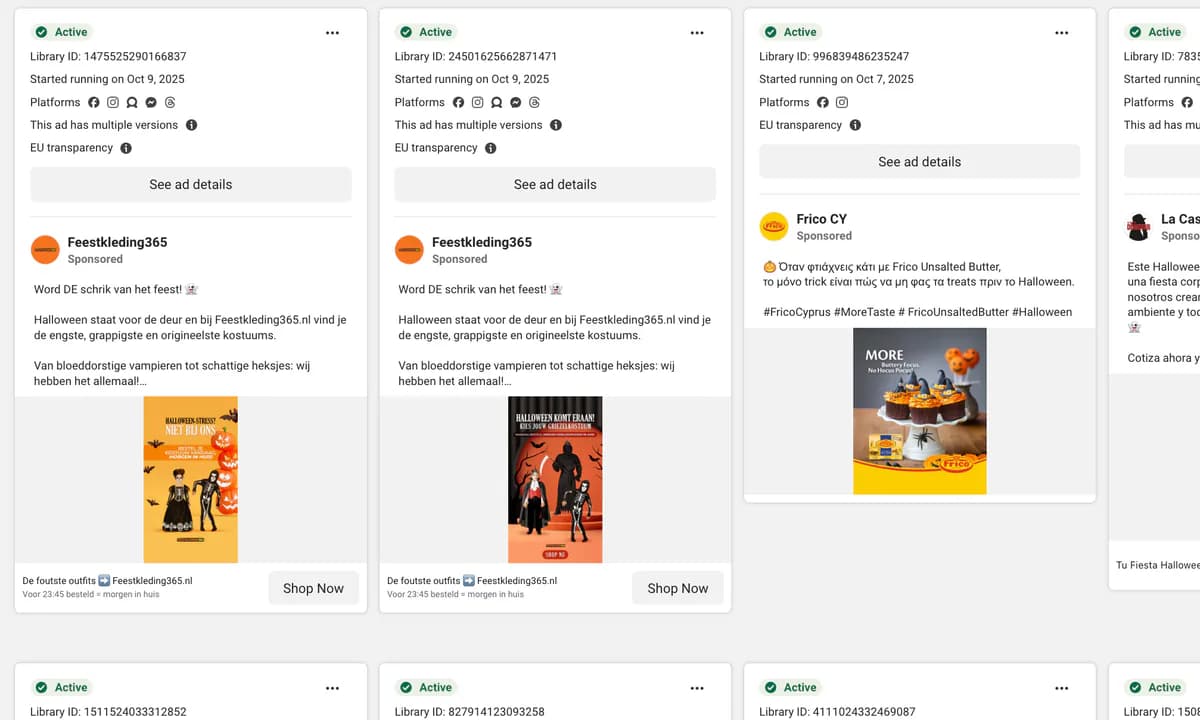
Find Scaling Products in the Meta Ads Library—Fast and Easy
If you’re still “feeling out” product ideas with tiny ad spends, you’re paying a tax called guesswork. Insights by Trampolin.ai cuts that tax. Paste a product URL, see who’s pushing it on Meta, learn which creatives do the heavy lifting, and decide in minutes whether it deserves your budget. This guide walks through why budgets burn, what Insights shows you, and a repeatable workflow to go from idea to green-light without lighting money on fire.
Why ad budgets get burned (and how to stop it)
Most wasted budgets die the same way: slow research, scattered tabs, and decisions made on vibes. Add one or two of these and your CPA quietly climbs:
- Creative without a hook. No thumb-stop in the first second means no chance to persuade.
- Copy–offer mismatch. Promising “premium” to a discount audience (or vice versa).
- Fatigue you don’t see. Re-running yesterday’s winner into a saturated feed.
- Landing-page whiplash. Ad promises X; page talks about Y; intent collapses.
- Shapeless testing. Changing five variables at once kills learnings.
The fix: reduce uncertainty before you spend. Insights replaces hunches with clear reach and creative-level signals gathered from Meta’s Ads Library, so you can cut losers pre-launch and shape tests around what the market is already rewarding.
What you actually get from a single URL
Drop in a product link and you’ll see actionable signals—fast:
- Total reach & trend lines. Is momentum building or fading? Zoom the timeline to avoid buying tops or missing early runs.
- Per-creative intelligence. Which specific videos/images are moving the needle, not just which ad sets are noisy.
- Competitor visibility. Who’s advertising the product, how hard they’re pushing, and whether their cadence is ramping or cooling.
- One-click verification. Jump straight to the live ad in Meta’s library to cross-check creative, captions, and date ranges.
- Store context. See which actual stores are behind the ads so you benchmark real operators, not rumors.
Translation: Instead of guessing if a product “feels hot,” you get evidence that it’s being pushed—and how it’s being pushed—right now.
----------------------
----------------------
The simple ROI math (illustrative)
One product that truly scales pays for your plan many times over. Let’s say early validation usually burns €300–€500/month on dead-end tests. If Insights helps you kill just two of those before launch and reallocate to a better candidate, you’ve recovered a large chunk of spend immediately—plus the compounding effect of learning from stronger tests. That’s how process beats luck.
Built for speed, priced for reality
You don’t need training, plugins, or a PhD in data wrangling. URL in → insight out. Start with the plan that fits your volume and step up only when you outgrow it. The goal isn’t to drown you in dashboards—it’s to answer “Should we test this?” in under a minute, consistently. (Full pricing details are linked later in this post.)
Workflow: from URL to decision in ~60 seconds
- Copy a product URL from a Shopify store you’re researching.
- Paste into Insights and let the platform fetch ad-reach signals.
- Scan the chart: is reach rising, flat, or rolling over?
- Open the creative list: sort by per-creative reach; note hooks, formats, and opening 3 seconds.
- Verify the top ads in Meta’s live page (one click) to confirm dates and variants.
- Green-light or pass based on trend + creative strength. If you green-light, write a brief that mirrors the winning hook/structure (never the pixel), then launch a controlled test.
Tip: Keep a short daily routine—check 5–10 URLs, shortlist the top 2–3 with clean momentum and strong creative, run only those through your landing-page tests. Less guessing, more doing.
How to read creative signals (without overthinking it)
- Hook speed: How fast until the promise appears? Winners reveal within 1–2 seconds.
- Outcome clarity: Can you see the result, not just hear claims?
- Angle pattern: Problem → outcome → proof is still undefeated for new prospects.
- Social proof: Real UGC often outperforms studio for many categories—note which your niche rewards.
- Cadence: If a top ad’s been hammered for weeks without variants, assume fatigue is near—refresh the angle before copying a tired concept.
Use these notes to brief your own variants. You’re copying the structure, not cloning the ad.
Use cases you can steal this week
- Quick validation before creative spend. Check who’s scaling and which creatives have reach; tailor your first two concepts to those hooks.
- Angle discovery. Sort by per-creative reach to surface the dominant visual cues in your niche before you write a headline.
- Beat slow cycles. A 10-minute daily scan spots momentum early and helps you pivot faster than rivals.
- Team workflow. On higher tiers, pipe findings into internal tools via API so sourcing and media buying run on the same clock.
Who gets the most from Insights
- Solo sellers, e-com sellers, online merchants & dropshippers who want winners with fewer paid “experiments.”
- Agencies validating products across multiple clients on tight timelines.
- DTC brands that care about creative-level learning and efficient scaling.
- Analysts & growth teams who prefer decision-ready data to dashboards that need babysitting.
Common mistakes Insights helps you avoid
- Relying on gut after sunk costs. Don’t wait for three losing tests to say what a URL would’ve said in 30 seconds.
- Over-indexing on a single screenshot. Reach without trend context is a trap—use the timeline.
- Misreading winners. Likes and comments ≠ performance; track per-creative reach instead.
- Copying stale angles. If your feed is saturated with the same opener, it’s already tired; remix the hook.
From insight to execution: your first controlled test
- Lock the angle. Choose one structure (e.g., Problem → Outcome → Proof).
- Build two distinct concepts. Not color swaps—concept swaps (demo vs. transformation).
- Mirror the promise on page. Headline and first CTA block must repeat the ad’s claim verbatim.
- Pre-commit rules. Define thresholds for kill/keep/scale before you spend.
- Log changes. A simple change log prevents re-testing old mistakes.
Reading early signals (48–72h): Thumb-stop & 3-second holds → creative health. Outbound CTR → curiosity. Meaningful comments → intent. If attention is weak, fix creative; if clicks are strong but carts are empty, fix offer/page.
Accuracy, updates, and methodology (in plain English)
Signals are sourced from Meta’s Ads Library and refreshed regularly. We validate, dedupe, and refine the methodology on a rolling basis to keep noise down and signal sharp—especially around duplicated variants and rapidly iterating ads. The point isn’t to be academic; it’s to give you a reliable, decision-ready picture of what’s scaling and why.
----------------------
----------------------
When to upgrade your plan
Start small if you’re evaluating a handful of products per week. When your shortlist keeps bumping against monthly URL limits—or you need API access to automate sourcing—move up a tier. As your cadence increases (daily scans, multi-store tracking, team workflows), the time saved by automation usually dwarfs the delta in price. Exact limits and tiers are detailed on the pricing page.
Pricing that pays for itself
Starter is for individuals, Growth for teams increasing volume, Scale for operators who need API + faster processing, and Enterprise for high-throughput with SLA support. Choose monthly to test the waters; go annual once the workflow is embedded to lock in savings. Fair-use buffers ensure your most productive weeks don’t grind to a halt.
FAQs (quick hits)
What platforms do you track today?
Shopify-based products advertised on Meta.
How often is the data updated?
Regularly, so you’re not chasing ghosts or week-old trends.
Do I need training?
No. The dashboard is clean and self-explanatory—URL in → insight out.
Can I cancel?
Yes. Anytime from your account settings.
How do I know a spike isn’t fake?
Use trend context and per-creative breakdowns. If only one variant spikes for 24h and disappears, treat it as noise until confirmed.
What if my niche is small?
Small niches still show patterns: which angles appear, how often, and which stores try to scale. Use relative changes, not absolute numbers.
A 10-minute daily routine (copy this)
- 2 minutes: Drop 5–10 URLs you’ve bookmarked; pin any with rising reach.
- 3 minutes: Open the top creatives; note the first 2 seconds and outcome shots.
- 2 minutes: Verify the live ads; confirm dates/variants.
- 3 minutes: Choose 1–2 to brief; write the hook and proof line; mirror on landing page.
Run this loop each morning. The compounding effect is fewer dead tests and more shots on goal that deserve budget.
Want to see it in action first?
Prefer to watch before you click? You can request a brief live demo or even try a free live test that shows real product analyses. We’ve linked those below together with the FAQ and the full pricing breakdown so you can decide with confidence.
Free Trial: How to Sign Up for Insights - Powered by Trampolin.ai
Getting started takes less than a minute. There’s a 14-day free trial and you won’t be asked for a credit card.
- Go to the Signup page and create your account.
- Paste your first product URL and run your initial analysis.
- Use your free trial analyses to validate a shortlist and plan your next moves.
Ready now? Start here.