Ethical & Practical Guide to Using Meta Ad Library for Research
If you’ve ever opened the Meta Ad Library and felt like you were staring into a warehouse of creative chaos, you’re not alone. This guide shows you how to do Meta Ad Library research ethically and efficiently—what’s allowed, what actually matters, and how to turn loose observations into confident decisions. We’ll cover competitive analysis best practices, explain how to interpret the information and numbers in Meta Ad Library, and show you a low-friction way to centralize findings in Insights so your team moves faster.
What the Meta Ad Library Really Shows (and What It Doesn’t)
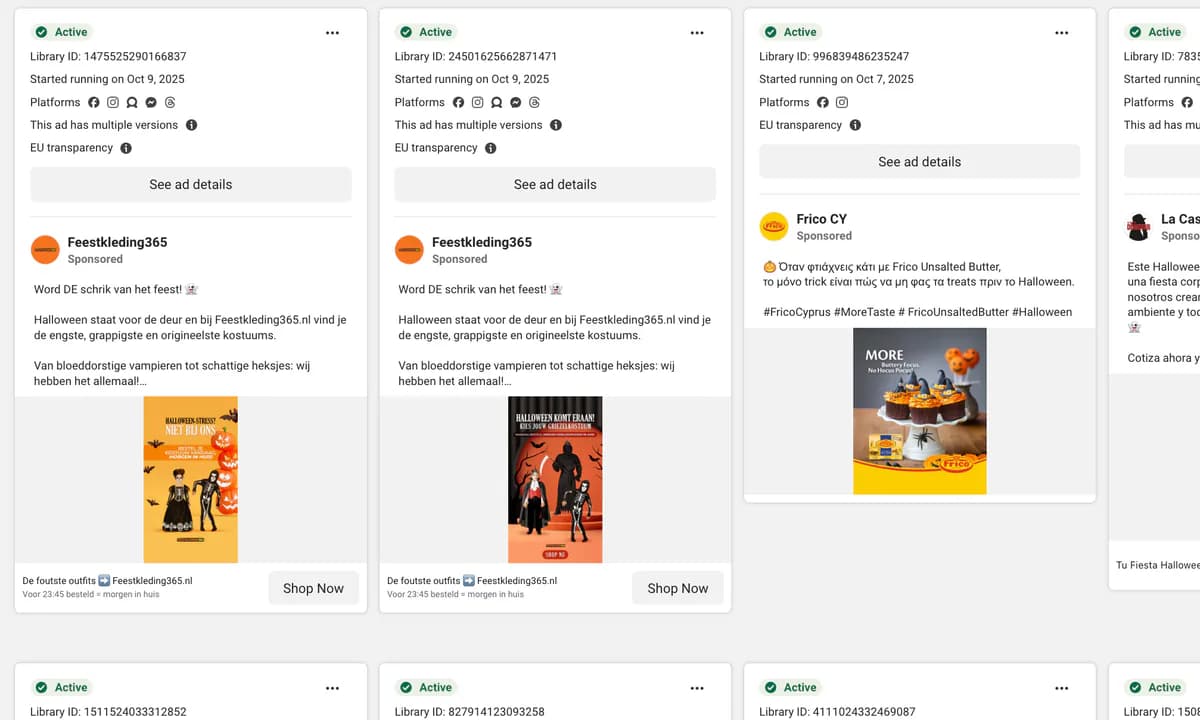
The Ad Library is a transparency portal: you can search and view ads currently running across Meta’s platforms and, for specific categories and regions, access limited historical context. It’s fantastic for spotting creative patterns and market activity. It is not a performance dashboard—so don’t expect cost, CTR, or conversion metrics for commercial ads. Instead, focus on observable signals:
- Longevity: ads that run for weeks without being turned off are often paying their way.
- Creative variation count: clusters of near-identical ads suggest systematic testing and iteration.
- Refresh cadence: frequent tweaks point to active optimization and momentum.
- Format/placement mix: heavy use of Reels/Stories often indicates direct-response pushes.
- Geographic spread: multi-market rollouts are a common proxy for scaling.
-----------------------
-----------------------
Ethical Guardrails: Do This, Not That
Treat the library as a research tool, not a loophole. Here’s a practical code of conduct:
| Do | Don’t |
|---|---|
| Respect Meta’s ad standards and local laws; use the tool for research, not scraping personal data. | Assume spend/ROI from the interface; for commercial ads, those numbers aren’t shown. |
| Borrow principles (hooks, structures) rather than cloning exact brand creative. | Copy trademarks or distinctive brand assets—it’s risky and rarely wins long-term. |
| Document search terms, dates, advertisers, and noteworthy patterns. | Overfit to a single viral outlier; seek patterns across time and advertisers. |
| Validate with longevity + iteration + market breadth (at least two signals). | Confuse politics-only/archive rules with commerce; availability varies by region. |
A Step-by-Step Manual Workflow (That Actually Works)
- Define the research goal: find trending products, benchmark a competitor, or map creative angles for launch.
- Assemble seed terms: product keywords, brand names, problem/benefit phrases, synonyms, common typos.
- Search the Meta Ad Library: run keyword and advertiser searches; test locations and placements to see where activity concentrates.
- Scan campaigns for signals: start dates, active/inactive status, volume of variants, refresh cadence.
- Qualitative scoring: message clarity, problem–solution fit, proof, creative variety.
- Pattern recognition: recurring hooks, proof types (UGC/testimonials/before–after), formats (short video, carousel, static).
- Document everything: record links and screenshots with dates so you can see acceleration or decay over time.
- Decide next actions: shortlist winners to test, or move to automation to validate reach and trend momentum.
How to Interpret the Information and Numbers in Meta Ad Library
- Ad start date & longevity: persistent ads imply viable unit economics; note when variants first appeared.
- Variation count: clusters of similar creatives = structured testing; growth teams iterate on winners.
- Format & placement mix: heavy Reels/Stories use suggests a short-form, direct-response posture.
- Copy patterns: repeated hooks (time-saving, pain relief, social proof, price anchors) signal resonance.
- Geography: expansion beyond one country is often a scale signal; narrow geos can mean testing.
- Promos and price dynamics: watch for anchor pricing, bundles, and seasonal offers.
- Red flags: over-claims, missing disclosures, and IP borrowing are legal/brand risks—avoid them.
Filters & Search Tips You’ll Actually Use
- Combine brand + product + benefit (“brand posture corrector back pain”).
- Try plural/singular and common typos to catch variants.
- Toggle locations to reveal regional pushes; EU vs US patterns often differ.
- Compare placements (Reels/Stories vs Feed) to prioritize hook style and aspect ratio.
- Track first-seen and last-seen dates to map the testing arc across variants.
- Inventory the most repeated thumbnails and opening seconds—those are durable hooks.
Centralize Findings in Insights (and Move Faster)
Manual research is powerful—but slow. Insights accelerates the workflow: paste a product URL and get decision-ready analytics based on Meta Ad Library data, including ad reach indicators, creative inventory, trend direction, and competitor visibility. You keep everything in one place, re-analyze with one click, and compare products side-by-side—no spreadsheets required.
-----------------------
-----------------------
Comparison: Manual Meta Ad Library vs. Insights
| Manual Library Research | Insights (Trampolin.ai) |
|---|---|
| Search keywords/brands individually; copy links to a doc. | Paste one product URL; analysis and saving are automatic. |
| Momentum inferred from proxies; hard to quantify. | Reach indicators and trend summaries presented in dashboards. |
| Screenshots and notes scattered across files. | All findings centralized; re-analyze anytime. |
| High effort to compare apples-to-apples. | Side-by-side comparisons reduce evaluation time dramatically. |
| No alerts or history unless you track manually. | Saved history; revisit and update as campaigns evolve. |
Mini Walk-Through (Hypothetical Example)
Suppose you’re researching a posture corrector. You search common terms and brands, spot three advertisers running UGC videos and short testimonials for 3–5 weeks with minor creative tweaks. You document hooks like “instant relief in 30 seconds,” note that two advertisers expanded from one to five markets, and see a shift from static to reels. You then paste the top product URL into Insights to validate whether reach and visibility are rising week-over-week, compare creatives in one view, save the analysis, and decide whether to test the angle in your funnel.
Common Pitfalls (and Quick Fixes)
- Cherry-picking a single viral ad: require at least two persistence signals (longevity + iteration) before you commit.
- Copying creative 1:1: abstract the underlying principle (hook/structure/proof) and rebuild in your brand voice.
- Confusing noise with scale: seek multi-market rollouts, broader format mix, and consistent messaging over time.
- Losing your notes: standardize a lightweight template and centralize it so the team can revisit quickly.
Best-Practice Documentation Template
Keep a repeatable template so research remains comparable:
- Product/Niche, Advertiser, URL, Search terms used
- Ad start date(s); still active? any creative refreshes?
- Creative notes: hooks, formats, proof elements
- Geography and placements observed
- Signals summary: longevity, iteration, breadth
- Decision: shortlist, watchlist, or discard (with reason)
- Insights link (if analyzed), next check-in date
FAQs (Short & Practical)
Does the Ad Library show spend or CTR?
No. For commercial ads, the library doesn’t expose spend, CTR, or conversion metrics. Use proxies like longevity, iteration, and market breadth.
Is copying a competitor’s ad safe?
Risky and rarely effective. Borrow principles (hooks/structures) and rebuild with distinct branding, proof, and offers.
How often should I re-check saved products?
Weekly during evaluation; daily if you’re actively launching. Look for fresh creatives, new geos, and stable hooks.
Where should I store research?
Centralize everything in one place. If you’re using Insights, keep URLs, screenshots, and notes tied to the analyzed product.
Resources & Links
Still have questions?
See the FAQ toward the end of your evaluation. Want a quick cost overview? Check Pricing. Prefer to watch it in action? Here’s a Live Demo. Need a small hands-on run first? Try the Free Live Test.
Free Trial: How to Sign Up for Insights - Powered by Trampolin.ai
Starting is simple: create your account, paste your first product URL, and review your dashboard in minutes. Our 14-Day Free Trial is no credit card required—explore features, save analyses, and upgrade only if it fits your workflow. When you’re ready, use the signup page to begin.